Market vs Limit Orders in Crypto: Which One to Use and When
Every trade starts with an order, and the order type decides two things: the price you actually get, and whether your trade happens at all. Most beginners press “Buy” with a market order and never think about it. That works on a calm, busy pair, but on a thin coin or in a fast market, it can quietly change your entry, your risk, and your result. This guide explains how market and limit orders work, what they cost you, and when to use each, with simple numbers you can check.
What is a market order?
A market order tells the exchange: fill this now, at the best price available. You choose the amount, but not the price.
It always fills on a liquid pair, which is its main strength. The price you get, though, is not the “last price” shown on the chart. A market buy fills against the cheapest sell orders waiting in the order book, and a market sell fills against the highest buy orders. The SEC’s investor bulletin on order types makes the same point for stocks: if other orders are filled first, a market buy can end up at a higher price than you expected.
What is a limit order?
A limit order tells the exchange: fill this only at my price or better.
A buy limit at 100 fills at 100 or lower.
A sell limit at 105 fills at 105 or higher.
If the price never reaches your level, nothing happens. The order waits in the order book until it fills, you cancel it, or it expires.
What are the bid, the ask, and the spread?
The order book has two sides:
The bid is the highest price a buyer is currently willing to pay.
The ask is the lowest price a seller is currently willing to accept.
The gap between them is the spread.
Example: the bid is 99.90, and the ask is 100.10. The spread is 0.20, or 0.2% of the price.
If you buy 2 coins with a market order, you pay the ask, 100.10. If you sold them a second later with another market order, you’d get the bid, 99.90. You’d lose 2 × 0.20 = 0.40 USDT before fees, even though the price on the chart didn’t move.
On large, busy pairs like BTC/USDT, the spread is usually tiny. On small coins with low trading volume, it can be much wider, which is one more reason small coins are riskier to trade.
What is slippage on a market order?
A market order doesn’t fill at one price. It works its way through the order book until the whole amount is filled. If there aren’t enough coins at the best ask, the rest fills at worse prices. The difference between the price you expected and your average fill price is slippage.
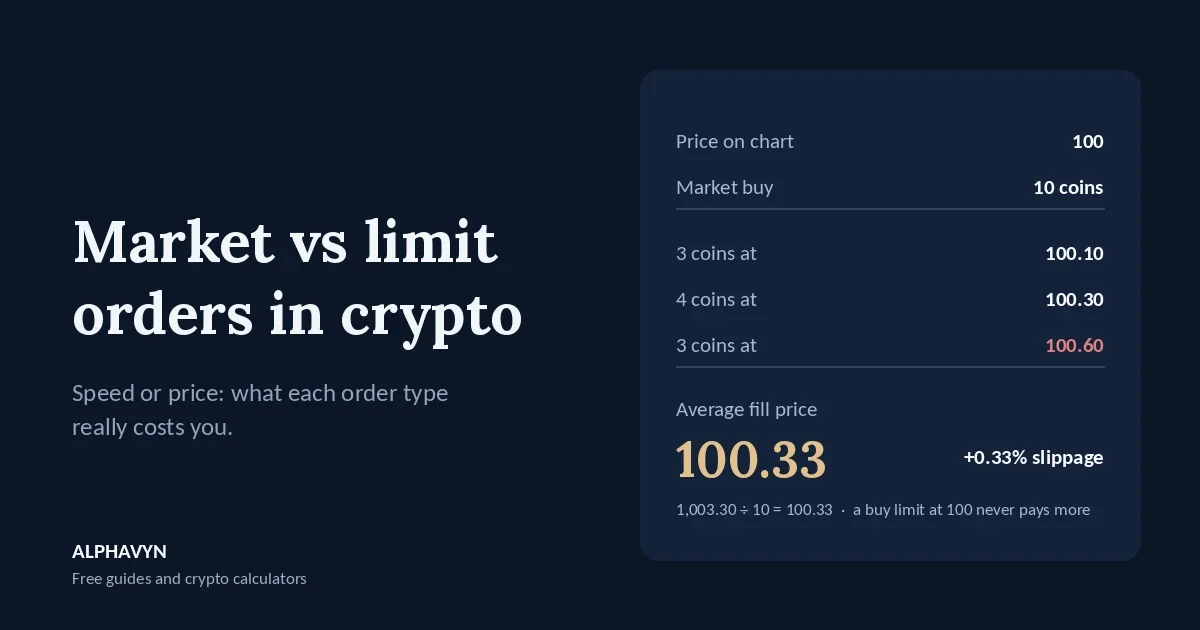
Example: the chart shows a last price of 100, and you place a market buy for 10 coins. The sell side of the order book looks like this:
Ask price | Coins available | What you buy | Cost |
|---|---|---|---|
100.10 | 3 | 3 | 300.30 USDT |
100.30 | 4 | 4 | 401.20 USDT |
100.60 | 5 | 3 | 301.80 USDT |
Total | 10 | 1,003.30 USDT |
Your average fill price is 1,003.30 ÷ 10 = 100.33, not 100. That’s 0.33% worse than the price you saw.
On a liquid pair with a small order, slippage is usually close to zero. It grows when the order is large compared with what’s waiting in the book, when the coin trades thinly, or when the market is moving fast.
How does slippage change your risk?
Slippage doesn’t just cost money. It changes the risk you planned.
Say you have a 5,000 USDT account and risk 1% per trade, which is 50 USDT. Your plan is entry 100, stop loss 95. That’s 5 USDT of risk per coin, so the position is 50 ÷ 5 = 10 coins. Our guide on how to calculate position size in crypto explains the formula.
With the market order above, your real entry is 100.33. Now the risk per coin is 100.33 − 95 = 5.33, and a stop-loss hit costs 10 × 5.33 = 53.30 USDT, about 6.6% more than you planned, before fees.
The stop loss can slip as well, because a standard stop order turns into a market order when it triggers. Our guide on how to plan a crypto trade explains why a real loss can be slightly larger than planned. Slippage and fees also make your real reward-to-risk slightly worse than the one on paper, as our guide to the risk/reward ratio in crypto explains.
Why might a limit order not fill?
A limit order protects your price, but it has its own risks.
It may never fill. If you place a buy limit at 100 while the price is 103, and the price rises to 110 instead, you miss the trade. Missing a trade costs nothing, but some traders then chase the price with a market order, which usually means a worse entry and a weaker reward-to-risk. Our guide on how to read a crypto signal shows how much a chased entry can damage a setup.
It may fill only partly. If only a few coins trade at your price before the market moves away, you hold part of the position you planned.
Example: your plan is 2 coins at 100 with a stop at 95, risking 10 USDT. Only 0.8 coins fill before the price rises to 103. Your risk is now 0.8 × 5 = 4 USDT. That’s fine, and it’s less than you planned. The mistake is buying the missing 1.2 coins at 103 with a market order. Those coins carry 103 − 95 = 8 USDT of risk each, or 9.60 USDT, bringing the total to 13.60 USDT, 36% more than your plan. If you add to a partial fill, size the new part from its own entry.
What is the risk of an old limit order?
Many exchanges let a limit order stay open until you cancel it, often called “good till cancelled”. That’s convenient, but an order you forgot about can fill when the reason for the trade no longer exists.
Example: on Monday you place a buy limit at 100, near support. By Thursday, support has clearly broken, and the price falls through 100 straight to 90. Your old order fills at 100 on the way down, and you’re instantly in a large loss on a setup that had already failed.
Two habits help:
Cancel limit orders when the idea changes. If support breaks or the plan no longer makes sense, the order should go too. Our beginner’s guide to support and resistance explains what a clear break looks like.
Attach the stop loss to the order. Many exchanges let you add a stop loss and take profit to a limit order, so they activate as soon as it fills. That way, a fill never leaves you in a position without a stop.
What happens if I set a buy limit above the current price?
It fills right away. A buy limit at 102, when the best ask is 100.10, means “buy at 102 or lower”, and 100.10 is lower, so the order fills immediately like a market order, but it can’t go above 102.
Some traders use this on purpose to get a fast fill with a ceiling on slippage. Just remember that an order that fills immediately is usually charged the higher taker fee, while a limit order that waits in the book is usually charged the lower maker fee. Our guide on how to calculate crypto profit after fees explains maker and taker fees with examples. Some exchanges also offer a “post-only” option, which cancels the order instead of letting it fill as a taker.
How do market and limit orders compare?
Market order | Limit order | |
|---|---|---|
Fills | Right away on a liquid pair | Only at your price or better |
Price | Not fixed; can slip | Fixed or better |
Main risk | Slippage and spread | Not filling, or filling only partly |
Typical fee | Taker | Maker, if it waits in the book |
Best for | Exits where speed matters | Planned entries and targets |
When should I use each order type?
Use a limit order to enter at a planned price. If your plan says entry at 100, a buy limit at 100 makes sure you don’t pay more. If it doesn’t fill, there’s no trade, which is the plan working as intended.
Use sell limits for your take-profit targets. If your plan is to close half at TP1 and half at TP2, you can place sell limits at both levels as soon as you enter. With 2 coins, entry 100, TP1 at 105 and TP2 at 110, that’s a sell limit for 1 coin at 105 and another for 1 coin at 110. You don’t have to watch the screen, and you get your price or better.
Use a market order when getting out matters more than the price. If your plan says exit and the price is moving fast, a small amount of slippage is usually better than a limit order that never fills while the loss grows.
Avoid large market orders on thin coins. On low-volume pairs, a big market order can walk deep into the order book. Check the order book first, or split the order into smaller limits.
For stop losses, use a stop order. A stop order waits until your stop price is reached and then sends an order. The difference between a stop-market and a stop-limit is explained in the FAQ of our guide on where to place a stop loss in crypto.
How do order types fit with ALPHAVYN signals?
ALPHAVYN only publishes analysis. It never places orders and never connects to your exchange, so the order type is always your choice. A signal’s entry is a price level, and a buy limit at that level is the simplest way to make sure you don’t pay more than the signal assumes. Split-entry signals already use a limit order for the second leg, as explained in how to read a crypto signal.
Whatever order type you use, size the trade from your real entry. You can check any setup on the free crypto signals page, then size it with the position size calculator.
Frequently asked questions
Is a limit order always better than a market order?
No. A limit order gives you price control, while a market order gives you certainty of filling. For planned entries and targets, price control usually matters more. For urgent exits, filling usually matters more.
Why did my market order fill at a different price than the chart showed?
The chart shows the last traded price. A market order fills against the orders waiting in the order book, starting at the best ask for a buy or the best bid for a sell, and moves to worse prices if your order is larger than what’s available at the best level. Spread and slippage explain the difference.
Can a limit order fill at a better price than I set?
Yes. A buy limit at 100 can fill at 99.80 if a seller is offering that price when your order is placed or reached. A limit only sets the worst price you accept.
Do limit orders expire?
It depends on the exchange and the option you choose. Some orders stay open until you cancel them, and some are cancelled at a set time. Check your open orders regularly and cancel any that no longer match your plan.
Before your next trade, decide your order type as part of the plan, and size the position from the entry you actually expect with the free position size calculator.